
Automating your WordPress site doesn’t have to feel like rocket science.
Tools like Make.com are powerful, but for many beginners, they can feel overwhelming. Between extra connection steps and complex setups (like webhooks), it’s easy to get stuck before anything actually works.
That’s where a plugin like Uncanny Automator makes a big difference. It lets you build Make.com–style workflows in WordPress using a simple setup that feels familiar and easy to follow.
You can connect your favorite plugins, trigger actions based on what users do on your site, and even add AI-powered tasks in just a few minutes.
In this guide, I’ll show you how I automated my WordPress site to work like Make.com.
The goal is simple: spend less time on repetitive tasks, keep things running smoothly, and focus more on growing your site instead of managing it.

💡Quick Answer: How to Add Make.com-Style Automation in WordPress
You can create Make.com-style automation in WordPress using Uncanny Automator by setting up a simple “if this happens, then do that” workflow, called a recipe. You choose a trigger, like publishing a new post, then decide what should happen next, such as generating an AI summary and saving it to Google Sheets. Once the recipe is set to Live, it runs automatically every time that trigger occurs.
Here is an overview of all the topics that I’ll be covering in this guide:
- Why I Moved Away from Make.com (And You Can Too)
- 🌟The Solution: Why Uncanny Automator Feels Like Make.com But Easier
- Real-World Workflow: How to Automate Blog Post Summaries with Uncanny Automator
- Step 1: Install and Activate Uncanny Automator
- Step 2: Connect OpenAI to Uncanny Automator
- Step 3: Connect Uncanny Automator to Google Sheets
- Step 4: Create Your Recipe in Uncanny Automator
- Step 5: Add the OpenAI Action to Generate Blog Post Summaries
- Step 6: Add the Google Sheets Action to Store Summaries
- Step 7: Save and Activate Your Recipe
- Next Steps for Building Make.com-Style Workflows Right in WordPress
- Frequently Asked Questions About Uncanny Automator vs. Make.com
- Additional Resources to Take Your Automations to the Next Level
Why I Moved Away from Make.com (And You Can Too)
I moved away from Make.com because it became harder to manage as my site grew. While it’s a powerful automation tool, the setup and maintenance can feel like too much if you just want things to work inside WordPress.
Make.com is a visual automation platform that helps you connect different apps and services using workflows called scenarios.

You build these workflows by dragging and connecting blocks, so when something happens in one app, it triggers actions in another.
It’s a great tool, but for many WordPress site owners, it can feel disconnected from how WordPress actually works day to day.
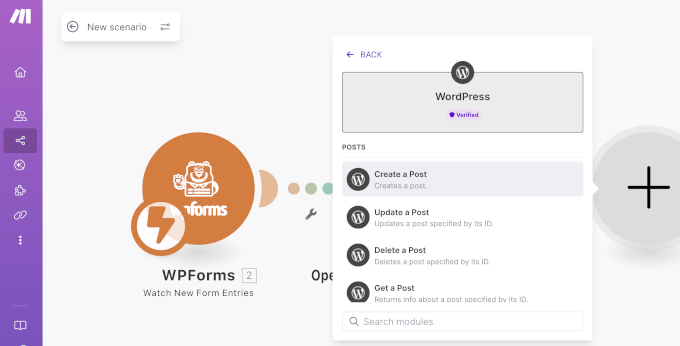
Over time, I wanted something simpler and more tightly integrated with my site.
3 Challenges That Made Me Switch Away From Make.com
Make.com stopped working for me once everyday automations began taking more time to set up and maintain than the tasks themselves.
Here are the three biggest reasons I decided to move away:
| Challenge | What It Means | Why It Matters |
|---|---|---|
| Steep Learning Curve | Even simple workflows require hours of tutorials to understand modules like Routers, Iterators, and Aggregators. | Beginners can get stuck before automations even start working. |
| Unpredictable Pricing | Costs depend on “operations,” which means you pay for every single internal step, filter, and logical check—not just the final result. Processing the exact same 500 WooCommerce orders can cost significantly more if you add a simple filter. | Hard to budget as your site traffic or sales grow. |
| Extra Complexity with WordPress | Integrating Make.com requires APIs, webhooks, and third-party connections. Workflows can break when plugins update, | Ongoing troubleshooting slows you down and adds stress. |
At that point, I realized I needed an automation solution that felt simpler, more predictable, and built specifically for WordPress.
What Make.com Does Really Well
In plain English, Make.com is great when you need lots of ‘if this, then that’ paths and you’re connecting many apps outside WordPress.
For instance, it has:
- A visual flowchart builder that lets you design automations by connecting steps visually, making it easy to understand how data moves from one action to the next.
- Built-in branching and routing using Router modules, so different actions can run based on conditions you set.
- A large integration library, with access to thousands of apps and services that you can connect without building everything from scratch.
- Advanced automation logic, including Iterators and Aggregators for working with lists of data, plus filters to control when actions run.
These features are great when you need detailed control over complex workflows. However, for many everyday WordPress automations, they can feel like more than you actually need.
When Does Using Make.com Still Make Sense?
Even though I moved away from Make.com, there are situations where it still works well:
- For Apps Outside WordPress – If you need to connect tools that Uncanny Automator doesn’t support, then Make.com gives you access to thousands of apps.
- Already Heavily Invested – If you’ve built a lot of workflows in Make.com, then switching everything might not be worth it right away.
- Advanced HTTP Modules – While Automator Pro handles most webhook needs, some very advanced HTTP requests might still be easier in Make.com.
In most everyday WordPress use cases, Automator handles everything smoothly, but it’s good to know Make.com can still be useful in these scenarios.
🌟The Solution: Why Uncanny Automator Feels Like Make.com But Easier
After running into too many challenges with Make.com, I finally found a solution that checks all the boxes: Uncanny Automator.
It is the best WordPress automation plugin that lets you connect your favorite plugins, WordPress features, and hundreds of external apps. You build workflows—called Recipes—using a simple visual builder.

It works like Make.com, but everything happens inside WordPress, so setup is faster, management is simpler, and scaling your site is easier.
With Automator, you get the power of advanced automation without learning new modules, dealing with broken workflows, or watching your monthly costs spike unexpectedly.
How Uncanny Automator Saves You Money
One of Uncanny Automator’s biggest advantages is cost-effectiveness. Because you pay a flat annual fee for unlimited Recipes and actions, you avoid the unpredictable per-operation costs that Make.com can add up to.
| Usage Scenario | Make.com Est. Yearly Cost | Automator Pro Yearly Cost | Annual Savings |
|---|---|---|---|
| 500 complex WooCommerce orders/month | $183 | $149 | $34+ |
| 1,000 form submissions/month | $348 | $149 | $199+ |
💡 Key advantage: Automator lets you create unlimited workflows and actions inside WordPress. While external tools like OpenAI may still charge usage fees, you won’t pay extra to Automator just for running the automation itself.
If you want to see exactly how Automator compares to Make.com in everyday WordPress workflows—and why it’s simpler and faster—just expand the section below:
Technical Feature Showdown: Make.com vs. Automator
| Feature | Make.com | Automator | Why Automator Wins |
|---|---|---|---|
| Conditional Logic | Add a Router module, configure filter conditions, and connect paths | Add Condition → select field, operator, value → actions run based on true/false | Easier to create rules based on user behavior |
| Processing Lists | Requires the “Iterator” module to split data lists using complex mapping | “Run an action for each item in a list” → map repeater field → create action inside loop | Automates repeated tasks like handling orders or form submissions quickly |
| Data Transformation | Write formulas, JSON, or RegEx | Use tokens ({{user_email}}) + visual Data Formatter (split text, math, AI summary) | Lets you change and format data visually without coding |
| WordPress-Native Advantage | Requires API/webhooks → slight delays | Direct database access → instant triggers | Faster, more reliable, less troubleshooting |
Real-World Workflow: How to Automate Blog Post Summaries with Uncanny Automator
With Uncanny Automator, you can create complex workflows much more easily than with Make.com. You don’t need to worry about APIs or webhooks because everything happens right inside WordPress.
Here are a few examples of what you can do:
- Automatically add new WooCommerce orders to a Google Sheet for easy reporting.
- Send notifications or emails whenever a new post goes live.
- Summarize post content using AI and store it in a spreadsheet for easy reference.
In this article, I’m going to show you how to create a workflow that automatically generates an AI summary and adds it to Google Sheets whenever a new blog post is published.
Here’s how it will work:
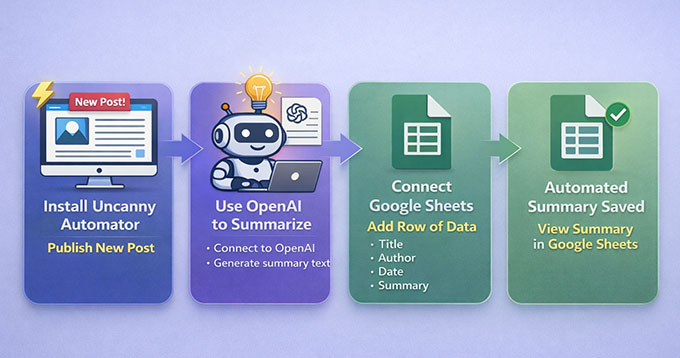
Even if you never store blog summaries in Google Sheets, this workflow teaches you the exact pattern you’ll use for automating forms, WooCommerce orders, email reports, and AI content across your site.
Once you understand this setup, you can reuse the same steps for almost any other automation on your WordPress website.
What You’ll Need for This Tutorial:
- A WordPress website where you can install plugins (administrator access).
- Uncanny Automator. You’ll need the Pro version for this OpenAI + Google Sheets workflow.
- An OpenAI Platform account with prepaid credits added.
- A Google account with access to Google Sheets.
- A Google Sheet ready. Even a blank one works, but it helps to add column headings in advance, like Post Title, URL, Date, and Summary.
Step 1: Install and Activate Uncanny Automator
The first thing you need to do is set up Uncanny Automator on your WordPress site.
Start by signing up for an account on the Uncanny Automator website. Just click the ‘Get Uncanny Automator now’ button and follow the steps to create your account.
📍Note: The free version includes limited credits to try app integrations. However, for a permanent workflow that runs automatically like this one, you will need the Pro plan.
Next, go to your WordPress dashboard to install the plugins. First, install the free core plugin from the WordPress repository. Then, install the premium plugin using the ZIP file you can download from your Uncanny Automator account.
The premium plugin unlocks the integrations you need for OpenAI and Google Sheets. If you’re unsure how to do that, check our step-by-step guide on installing WordPress plugins.
Upon installation, it’s time to activate your license. Go to Automator » Settings in your WordPress dashboard and enter the license key from your Uncanny Automator account.
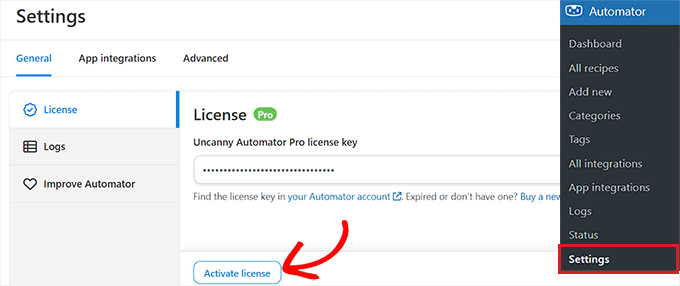
Click the ‘Activate License’ button, and your website will be ready to start creating automation workflows.
Step 2: Connect OpenAI to Uncanny Automator
For this workflow to work, you need to connect your OpenAI account to Uncanny Automator. This allows OpenAI to automatically generate summaries of your blog posts before they are added to your Google Sheets reports.
The good news is you only have to connect it once.
To get started, you’ll need your OpenAI secret key. A secret key is a unique code that tells OpenAI it’s really you using their service. It keeps your account secure and allows Uncanny Automator to access OpenAI safely.
To find your secret key, log in to your OpenAI account and go to the ‘API Keys’ tab in the left-hand menu. Here, click the ‘Create new secret key’ button.
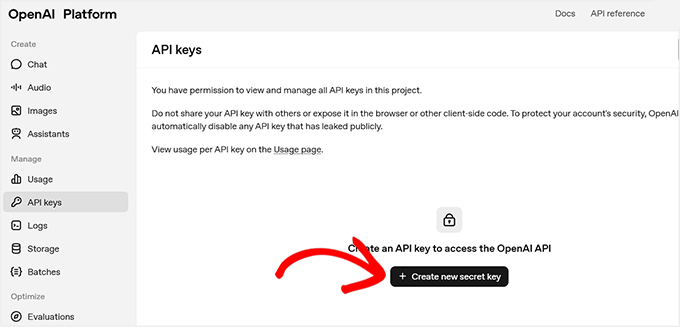
You’ll be prompted to give it a name—this is just for your reference, so you can identify it later.
📍Important: Your OpenAI API account is completely separate from a ChatGPT Plus subscription. You must purchase pre-paid credits in your OpenAI Platform billing settings for the API key to work. Without a credit balance, the automation will fail.
Once you’ve added credits, click ‘Create Secret Key’.
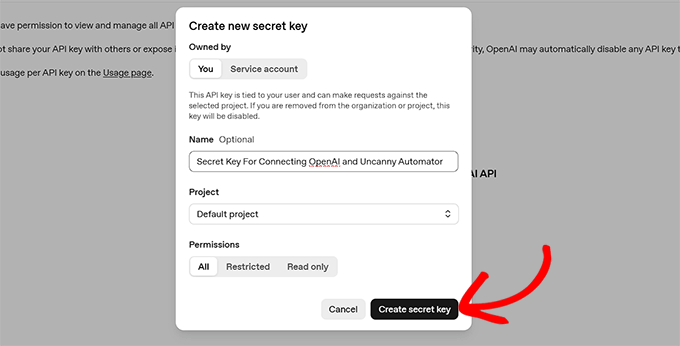
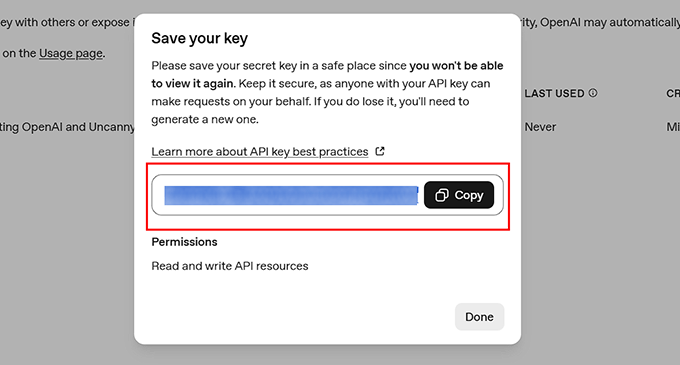
OpenAI will generate the key and display it in a popup.
Copy this key and store it somewhere safe, because you won’t be able to see it again.
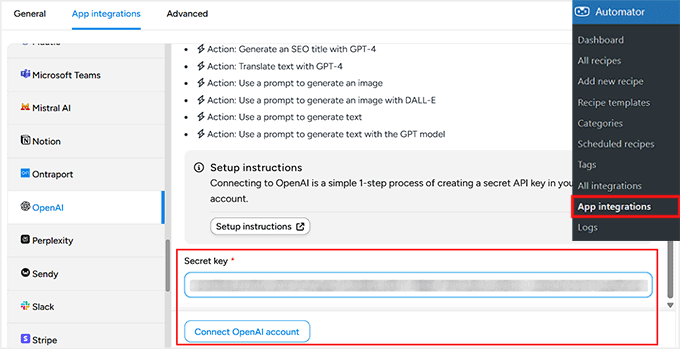
Next, go to your WordPress dashboard and open the Automator » App Integrations page. Then, switch to the ‘OpenAI’ tab on the left and paste your secret key into the ‘Secret Key’ field.
After that, click ‘Connect OpenAI Account’. Once this is done, your Uncanny Automator and OpenAI accounts are connected.
Now you’re ready to add triggers and actions using OpenAI in your workflows. This connection allows you to automatically summarize posts or perform other AI-powered tasks whenever a workflow runs.
Step 3: Connect Uncanny Automator to Google Sheets
The next step is to connect Uncanny Automator to Google Sheets. This will allow all your blog post summaries to be added to your chosen spreadsheet.
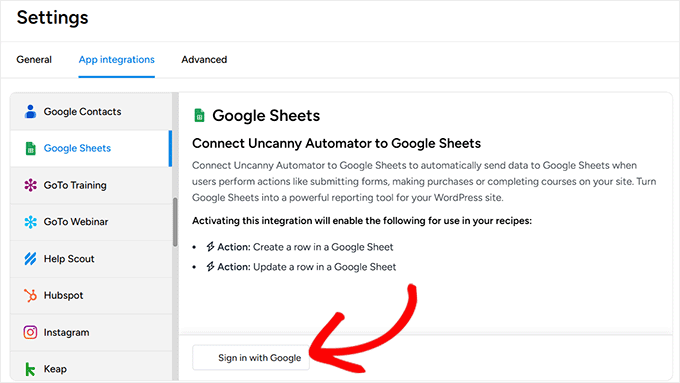
To get started, go to Automator » App Integrations in your WordPress dashboard and select ‘Google Sheets’ from the left-hand menu.
Click the ‘Sign in with Google’ button and choose the account you want to link. If your account isn’t listed, you can add it using the ‘Use Another Account’ option.
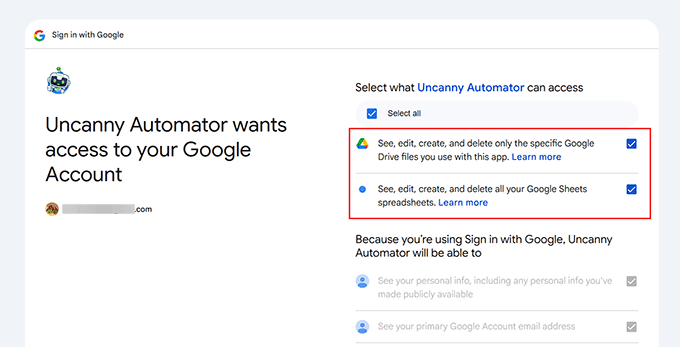
Next, Google will ask for permissions so Uncanny Automator can access your spreadsheets.
This is completely normal, and the plugin only uses these permissions to add new rows to the spreadsheets you select.
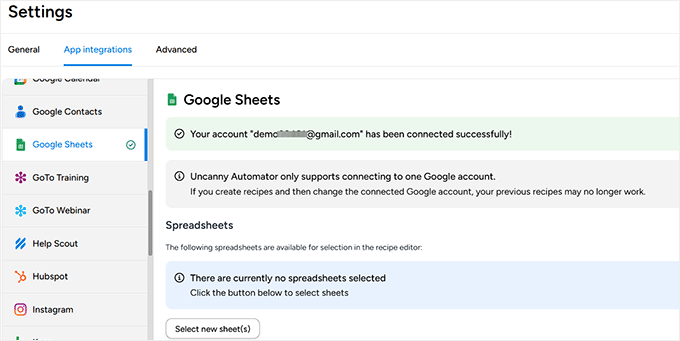
Once you approve, you’ll be redirected back to your WordPress dashboard with a confirmation that your Google account is connected.
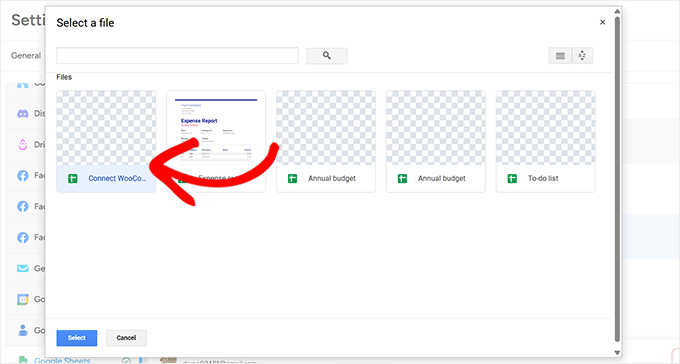
Finally, click ‘Select new sheet(s)’ and choose the spreadsheet you want to use for storing your post summaries.
You can add multiple spreadsheets if needed, and all connected sheets will appear in the recipe editor when building automations.
If you want a more detailed guide, check out our tutorial on how to connect WooCommerce to Google Sheets.
Once your spreadsheet is connected, you’re ready to start building a workflow that summarizes posts and automatically sends them directly to Google Sheets.
Step 4: Create Your Recipe in Uncanny Automator
Once you’ve successfully connected OpenAI and Google Sheets, it’s time to create a recipe in Uncanny Automator.
In Automator, a recipe is what defines your automation. Each recipe has two main parts: the trigger, which starts the automation, and the action, which is what happens next.
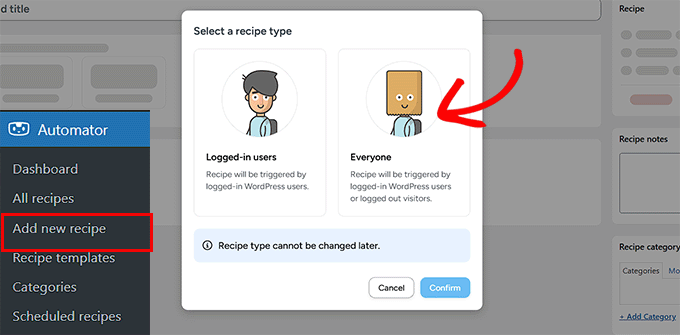
To start, go to Automator » Add New Recipe from your WordPress dashboard. You’ll be asked to choose between a ‘Logged-in’ recipe and an ‘Everyone’ recipe. Logged-in recipes only run when a user is signed in.
For this workflow, I recommend selecting Everyone.
Here’s why: If you schedule posts to be published automatically in the future, WordPress publishes them in the background (using the system cron) rather than using a logged-in user. Selecting ‘Everyone’ ensures the automation runs reliably for scheduled posts, too.
Next, give your recipe a name that makes sense, like ‘Blog Post Summary to Google Sheets’. This will help you identify it later when you create more recipes.
After that, Uncanny Automator will show a list of all plugins and services installed on your site. Select ‘WordPress’ as the integration platform for your trigger.
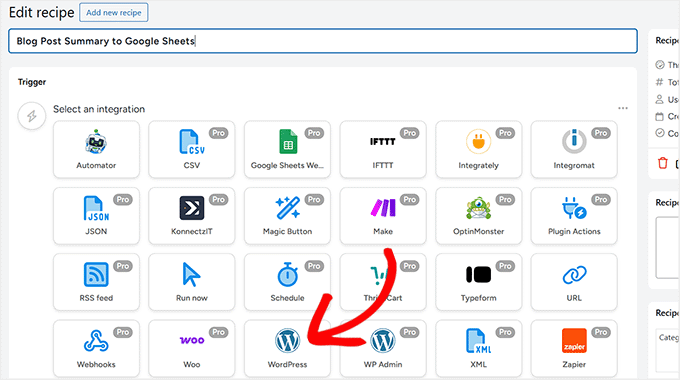
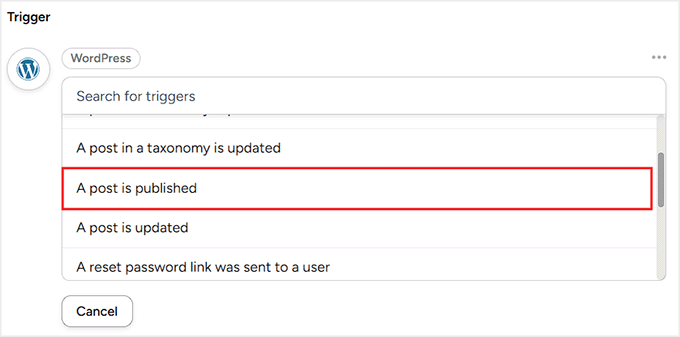
Then, choose the event that should start the recipe. For this workflow, select ‘A post is published’.
This ensures that every time a new post goes live, the recipe will run automatically.
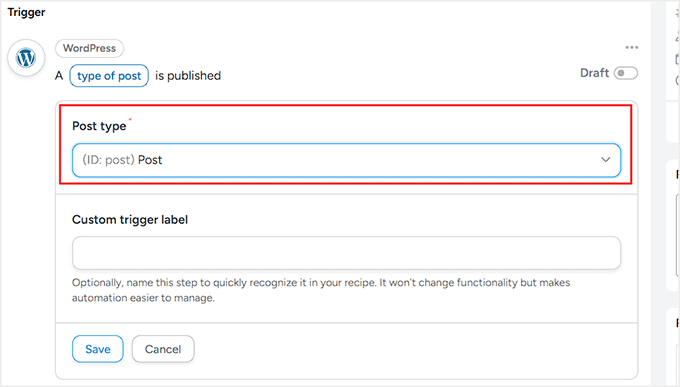
Finally, you’ll need to select the post type. By default, Uncanny Automator applies the trigger to all post types, including posts, pages, and products.
Since this workflow is only for WordPress blog posts, select ‘Post’ from the dropdown menu. Once that’s done, click ‘Save’ to activate your trigger.
Step 5: Add the OpenAI Action to Generate Blog Post Summaries
Now that your trigger is set, it’s time to add the first action for your recipe: generating a summary of the blog post using OpenAI.
To start, click the ‘Add Action’ button inside your recipe.
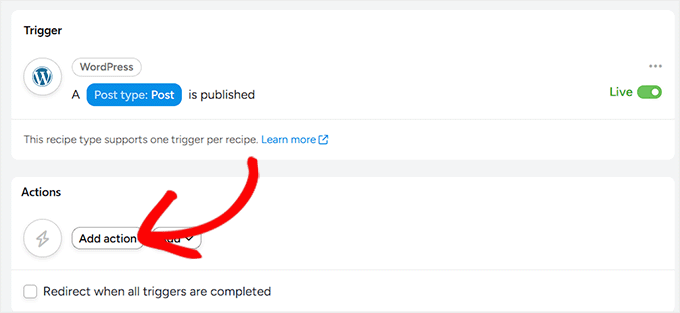
This will open a list of integrations for your action.
Since you’ve already connected OpenAI, click on it to select the platform.
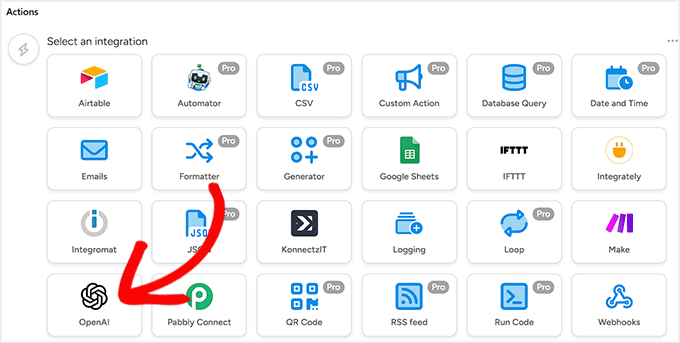
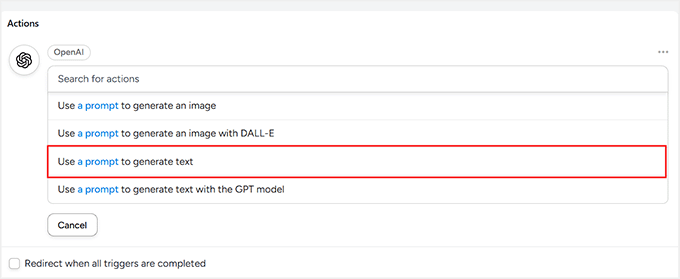
You’ll see a list of actions OpenAI can perform.
For this workflow, select ‘Use a prompt to generate text’. This tells OpenAI exactly what content to create.
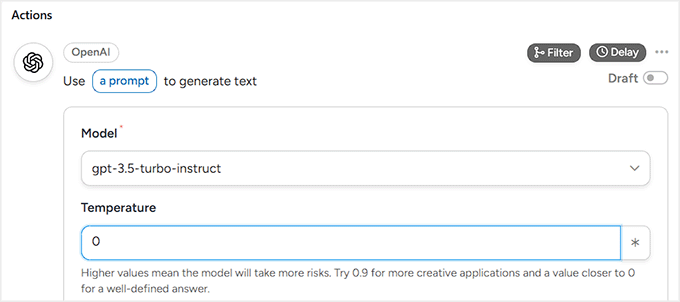
Next, choose the OpenAI model. I recommend the latest available model, as it produces the most natural and accurate summaries.
Now, set the Temperature. This controls how closely the AI sticks to the facts versus how creative it gets. For a blog summary, you want the AI to be predictable and factual, so I recommend setting the temperature to 0.
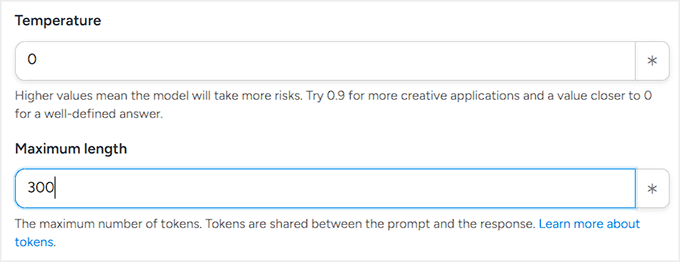
Set the maximum number of tokens next. Tokens are the units OpenAI uses to measure text. Roughly speaking, 1 token is about 1 word or 4 characters. So a 200-word summary would need around 300–350 tokens.
Tokens also affect pricing. Keep in mind that OpenAI charges for both the text it reads (your blog post) and the text it writes (the summary). Setting the Maximum Tokens to 300 ensures the summary doesn’t get too long, helping you control your costs.
Finally, set your prompt. A good prompt clearly tells OpenAI what you want. For this workflow, you could use something like:
‘Create a concise summary of the following blog post content in around 200 words. Focus on the main points and key takeaways: {{Post Content (Formatted)}}.‘
If you’re new to creating prompts for AI, please take a look at our guide to the best AI prompts for bloggers, marketers, and social media.
Here, the {{Post Content (Formatted)}} token ensures OpenAI knows exactly which blog post to summarize. This is different from an OpenAI API token (the secret key you connected earlier).
The OpenAI token grants Automator access to OpenAI, while these recipe tokens tell the AI which content to include in the generated text.
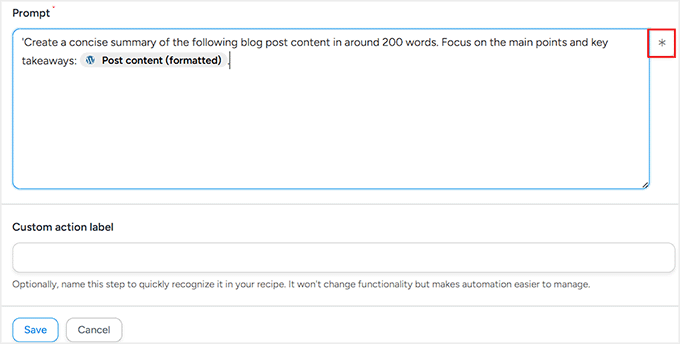
You can add these tokens by clicking the asterisk in the prompt editor. Uncanny Automator will display a list of available tokens, such as the post title, author name, publication date, and more.
Once everything is set, click ‘Save’ to store the action. Your recipe now has a trigger and a first action that generates concise, AI-powered summaries whenever a new post is published.
Step 6: Add the Google Sheets Action to Store Summaries
Now it’s time to add the second action to your workflow. This action will automatically create a row in your chosen Google Sheet and add the summary generated by OpenAI.
This is what makes the workflow truly useful because all your post summaries will be automatically stored and organized.
To add this action, click the ‘Add Action’ button again in your recipe. Select Google Sheets as the integration this time.
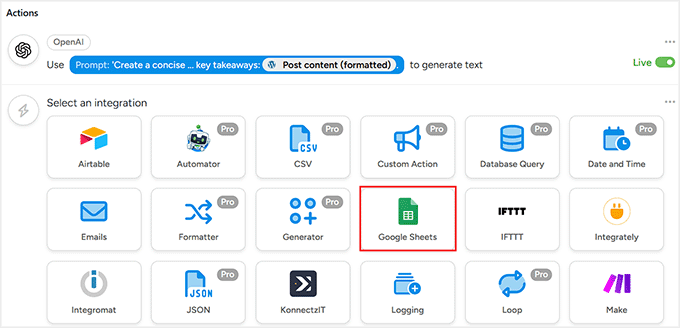
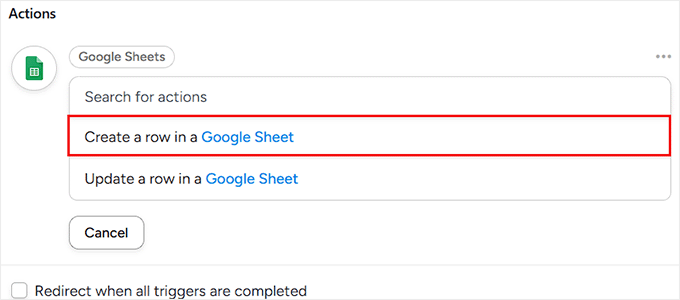
Uncanny Automator will then show a list of actions it can perform. For this workflow, choose ‘Create a row in a Google Sheet’.
This tells Automator to add a new row to your spreadsheet whenever OpenAI generates a summary for a new blog post.
Next, you’ll see a dropdown to select the Google Spreadsheet you connected earlier. Choose the spreadsheet where you want to store your blog post summaries.
Then, select the worksheet (tab) inside that spreadsheet.
If your file only has one sheet, you don’t need to worry. But if your spreadsheet has multiple tabs, make sure you select the correct one so your data doesn’t end up in the wrong place.

After that, scroll down to the ‘Rows’ section. This is where you map your blog post data to the columns in your Google Sheet.
Don’t worry, because mapping is simpler than it sounds. You’re just matching each column in your spreadsheet with the right piece of information from your post or the OpenAI summary.
To start mapping, click the asterisk (*) icon next to a field. This opens a list of available data that Automator can pull from the trigger (your blog post) and the OpenAI action.
Under the Triggers section, you’ll see options like post title, author name, published date, and more.
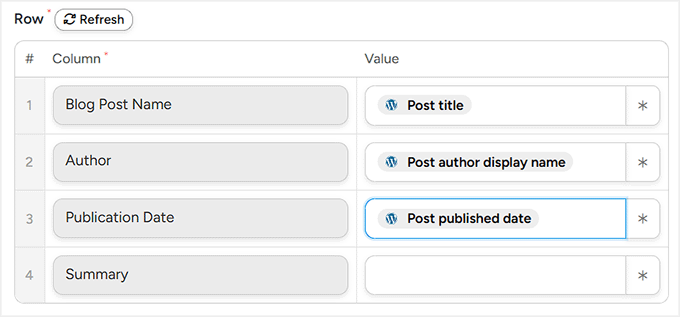
Under the Actions section, you’ll find ‘OpenAI Response’, which is the summary generated by AI.
Make sure to select ‘Response’ for the summary column in your sheet. This ensures the summary is automatically added to the correct column.
Take your time mapping each column carefully.
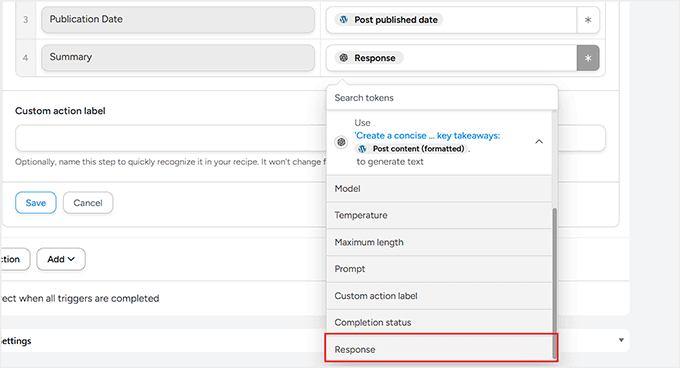
Once you’ve matched all the fields, click ‘Save’ to store your settings.
Step 7: Save and Activate Your Recipe
Now that both your trigger (a new post published) and your actions (generating a summary with OpenAI and adding it to Google Sheets) are set up, it’s time to make your recipe live.
Before activating, take a moment to double-check all your mappings. Make sure the columns in Google Sheets match the blog post information, and that the OpenAI summary is mapped to the correct column.
This ensures that every new post is added correctly without errors.
Once you’re confident everything is correct, toggle the Trigger and Action switches to ‘Live. Then, in the right-hand column, change the recipe status from ‘Draft’ to ‘Live’.
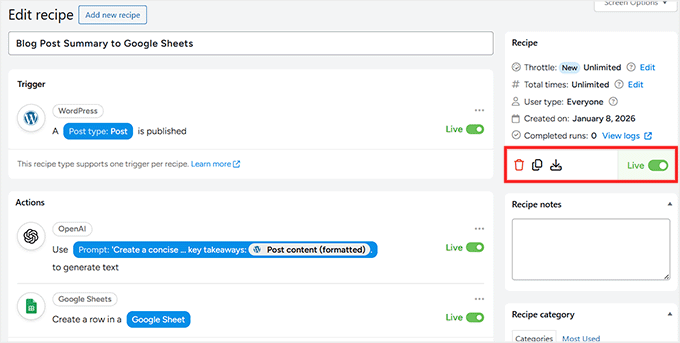
And that’s it! Your automation is now active.
To test it, simply go to Posts » Add New and publish a blog post (or update an existing one if you set the trigger to update).
Give it a few seconds, then check your Google Sheet. You should see a new row appear automatically with your AI-generated summary.
Next Steps for Building Make.com-Style Workflows Right in WordPress
Overall, after creating workflows with both Make.com and Uncanny Automator, I can confidently say that building complex automations with Uncanny Automator is so much easier.
Other than the blog post summary workflow I showed above, you can also create workflows like these, and they’re much simpler to set up in Uncanny Automator compared to Make.com:
| Workflow Example | Why It’s Easier in Uncanny Automator | Make.com Complexity |
|---|---|---|
| Send automated email notifications when a user submits a form, places an order, or completes a course | Direct trigger from WordPress forms, WooCommerce, or LMS, with simple dropdowns for actions | Requires setting up webhooks, parsing JSON, and mapping multiple apps |
| Add new WooCommerce orders to spreadsheets for reporting or bookkeeping | Connect WooCommerce → Google Sheets in minutes, with field mapping inside WordPress | Needs multiple modules, API keys, and data parsing for each order |
| Generate AI-powered summaries or content for posts, emails, or internal reports | OpenAI integration directly inside WordPress, and tokens handle content dynamically | Must configure HTTP modules, API calls, and handle JSON manually |
| Sync user data between plugins (memberships, LMS, CRM) | Automator reads plugin data natively, and the triggers and actions are simple | Each plugin requires a separate API setup and webhooks |
| Schedule follow-ups automatically (membership renewals, course completions) | Native WordPress events trigger actions, with no external scheduler | Multiple modules, time delays, and extra setup per platform |
Once your first workflow is live, you can confidently explore and create new automations that save time, streamline processes, and make your WordPress site smarter.
Frequently Asked Questions About Uncanny Automator vs. Make.com
Now that you’ve seen how Uncanny Automator can simplify Make.com-style workflows in WordPress, you probably have a few questions.
To make things easier, I’ve answered some of the most common questions about AI, automation, and how these tools work together:
Can Uncanny Automator handle complex workflows like Make.com?
Yes! For workflows that mostly involve WordPress and its plugins, Uncanny Automator can handle them just like Make.com—but without the extra setup, APIs, or webhooks.
Do I need coding skills to use Uncanny Automator?
No coding is required. The visual Recipe builder and tokens make creating automations as simple as point-and-click.
What’s the difference between the Free and Pro versions of Uncanny Automator?
The Free version gives you unlimited recipes with all the basic triggers and actions you need to get started.
The Pro version steps it up with conditional logic, loops, scheduled automations, over 150 integrations, and even multisite support—basically everything you need for more advanced workflows.
Will using Uncanny Automator slow down my WordPress site?
Not significantly. Automator runs actions asynchronously, so site performance is minimally affected—mostly limited by your server resources.
Will Uncanny Automator summarize my existing blog posts?
By default, this recipe only runs when a new post is published. It will not go back and summarize your old posts automatically. However, Uncanny Automator Pro includes a feature to run recipes on existing content if you need to bulk-update your site.
Can I migrate my existing Make.com workflows to Uncanny Automator?
There’s no one-click migration. You’ll need to manually rebuild workflows: Router → Condition, Iterator → Loop, HTTP → Webhook. But once set up, Uncanny Automator’s WordPress-native integration makes maintenance much easier.
Additional Resources to Take Your Automations to the Next Level
If you’re ready to get even more out of Uncanny Automator, there’s a ton you can explore.
From advanced workflows to AI-powered automations, here are some articles to help you out:
- How to Add n8n Like Automation in WordPress (Easier & Cheaper)
- How I Use AI to Autogenerate WooCommerce Product Descriptions
- How to Automatically Post to Threads From WordPress
- How to Automatically Post to Facebook From WordPress
- My Guide to Automatically Publish from WordPress to Instagram
If you liked this article, then please subscribe to our YouTube Channel for WordPress video tutorials. You can also find us on Twitter and Facebook.
The post How I Went From Zero to Make.com-Like Automation in WordPress (The Easy Way) first appeared on WPBeginner.
Discover more from Complete Nursing Solution
Subscribe to get the latest posts sent to your email.

bbccasino https://www.itbbccasino.net
closest casino
References:
maps.google.com.tr
lisanslı casino siteleri: casino siteleri
https://mostbettr.icu/# mostbet giris
https://mostbetpl.buzz/# mostbet
https://mostbettr.blog/# mostbet güncel giriş
mostbet casino [url=https://mostbettr.icu/#]mostbet[/url]
mostbet güncel adres [url=https://mostbettr.icu/#]mostbet[/url]
mostbet güncel giriş: mostbet
mostbet giriş [url=https://mostbettr.icu/#]mostbet[/url]
mostbet güncel adres [url=https://mostbettr.icu/#]mostbet[/url]
mostbet casino [url=https://mostbetvipaz.buzz/#]mostbet[/url]
mostbet güncel: mostbet
mostbet güncel giriş [url=https://mostbettr.blog/#]mostbet[/url]
https://mostbettr.blog/# mostbet giriş
mostbet resmi giriş: mostbet
mostbet [url=https://mostbetpl.top/#]mostbet[/url]
https://mostbettr.icu/# mostbet güncel giriş
https://mostbettr.blog/# mostbet güncel
mostbet resmi [url=https://mostbettr.blog/#]mostbet[/url]
https://mostbetpl.top/# mostbet giris
mostbet güncel adres [url=https://mostbetvipaz.buzz/#]mostbet[/url]
mostbet giris: mostbet
https://mostbettr.blog/# mostbet resmi
https://mostbettr.icu/# mostbet güncel
mostbet güncel adres [url=https://mostbetpl.buzz/#]mostbet[/url]
https://mostbetpl.top/# mostbet
mostbet: mostbet
https://mostbettr.icu/# mostbet
mostbet güncel giriş: mostbet
us online pharmacy: generic sildenafil – canadapharmacyonline com
buy ed pills online: buy erectile dysfunction pills – True Health Pharm
cheapest erectile dysfunction pills [url=https://truehealthpharm.shop/#]True Health Pharm[/url] buy erectile dysfunction pills
online pharmacies that use paypal: Generic Viagra online – online canadian pharmacy reviews
american pharmacy: generic sildenafil – foreign pharmacy online
pet antibiotics and care [url=https://happypawspharmacy.com/#]pet pharmacy USA[/url] HappyPaws Pharmacy
https://happypawspharmacy.shop/# online vet pharmacy
ed medicines: True Health Pharm – True Health Pharm
pet drugs online: dog medicine – п»їdog medication online
pet pharmacy USA: pet pharmacy USA – vet pharmacy
online pharmacy ordering: VitalCore Pharmacy – legitimate canadian mail order pharmacy
sure save pharmacy [url=https://vitalcorepharmacy.shop/#]VitalCore Pharmacy[/url] prescription drugs online
good value pharmacy: sildenafil over the counter – pharmaceuticals online australia
best mail order pharmacy canada: buy Viagra over the counter – express scripts com pharmacies
https://happypawspharmacy.com/# pet pharmacy USA
online pharmacy for sale: VitalCore Pharmacy – canadian online pharmacy no prescription
onlinecanadianpharmacy [url=https://vitalcorepharmacy.com/#]VitalCore Pharmacy[/url] safe online pharmacy
online ed pharmacy: True Health Pharm – best online ed medication
express scripts pharmacy: sildenafil over the counter – best online foreign pharmacy
True Health Pharm: True Health Pharm – True Health Pharm
https://happypawspharmacy.com/# pet rx
True Health Pharm [url=https://truehealthpharm.shop/#]cheapest online ed treatment[/url] True Health Pharm
True Health Pharm: True Health Pharm – erectile dysfunction meds online
https://vitalcorepharmacy.com/# the pharmacy
HappyPaws Pharmacy: pet med – HappyPaws Pharmacy
pet antibiotics and care: HappyPaws Pharmacy – dog and cat medicine supply
pet antibiotics and care: HappyPaws Pharmacy – dog and cat medicine supply
best canadian pharmacy for viagra [url=https://vitalcorepharmacy.shop/#]VitalCore Pharmacy[/url] pharmacy express
https://truehealthpharm.com/# online erectile dysfunction medication
erectile dysfunction meds online: True Health Pharm – cheapest online ed meds
HappyPaws Pharmacy: vet pharmacy – online vet pharmacy
https://truehealthpharm.com/# ed meds online
online vet pharmacy: HappyPaws Pharmacy – HappyPaws Pharmacy
True Health Pharm [url=http://truehealthpharm.com/#]cheapest online ed meds[/url] best ed pills online
edmeds: ed medicine online – True Health Pharm
pet pharmacy USA: pet pharmacy USA – pet antibiotics and care
https://happypawspharmacy.shop/# pet prescriptions online
pet pharmacy USA: pet pharmacy USA – pet rx
HappyPaws Pharmacy: dog and cat medicine supply – pet antibiotics and care
True Health Pharm [url=https://truehealthpharm.com/#]True Health Pharm[/url] True Health Pharm
pet pharmacy USA: pet med – pet antibiotics and care
https://happypawspharmacy.com/# dog and cat medicine supply
True Health Pharm: ed medication online – online ed prescription
True Health Pharm: True Health Pharm – cheap ed drugs
True Health Pharm [url=http://truehealthpharm.com/#]cheapest ed online[/url] True Health Pharm
https://vitalcorepharmacy.com/# canadian pharmacy cialis 40 mg
dog and cat medicine supply: pet pharmacy USA – dog and cat medicine supply
https://vitalcorepharmacy.shop/# gold pharmacy online
best online foreign pharmacies: Viagra generic over the counter – pharmacy orlando
canadian pharmacy victoza: Viagra online price – mail pharmacy
ed pills cheap [url=https://truehealthpharm.shop/#]order ed pills[/url] True Health Pharm
https://happypawspharmacy.shop/# pet pharmacy USA
dog and cat medicine supply: pet antibiotics and care – pet antibiotics and care
cheapest online ed meds: best online ed meds – ed drugs online
http://medbridgepharmacy.com/# italian pharmacy online
mail order pharmacy india [url=https://trustrxindia.com/#]top online pharmacy india[/url] best online pharmacy india
MedBridge Pharmacy: canadian pharmacy discount coupon – MedBridge Pharmacy
MedBridge Pharmacy: best canadian online pharmacy – indianpharmacy com
can i order online from a mexican pharmacy: MedicoBridge RX – MedicoBridge RX
MedBridge Pharmacy: online pharmacy discount code – australia online pharmacy free shipping
top 10 online pharmacy in india [url=https://trustrxindia.com/#]TrustRx India[/url] top 10 online pharmacy in india
https://medbridgepharmacy.com/# pharmacy express
MedicoBridge RX: MedicoBridge RX – MedicoBridge RX
reputable online pharmacy: MedBridge Pharmacy – pharmacy today
indianpharmacy com [url=http://trustrxindia.com/#]TrustRx India[/url] pharmacy website india
medicine from mexico: MedicoBridge RX – mexico pharmacy list
online mexico pharmacy: MedicoBridge RX – MedicoBridge RX
online shopping pharmacy india: india online pharmacy – Online medicine order
buy prescription drugs from india: TrustRx India – Online medicine home delivery
https://medicobridgerx.com/# MedicoBridge RX
canadian pharmacy no prescription [url=https://medbridgepharmacy.shop/#]MedBridge Pharmacy[/url] MedBridge Pharmacy
world pharmacy india: TrustRx India – indian pharmacy
MedBridge Pharmacy: canadian pharmacy 24h com – MedBridge Pharmacy
the purple pharmacy mexico: MedicoBridge RX – MedicoBridge RX
reputable indian online pharmacy [url=http://trustrxindia.com/#]TrustRx India[/url] reputable indian online pharmacy
https://medbridgepharmacy.com/# MedBridge Pharmacy
MedicoBridge RX: mexican pharmacies that ship – MedicoBridge RX
indian pharmacy online: TrustRx India – best online pharmacy india
buy medicines online in india [url=https://trustrxindia.shop/#]TrustRx India[/url] top 10 pharmacies in india
MedBridge Pharmacy: medical mall pharmacy – online pharmacy without scripts
MedBridge Pharmacy: pharmacy delivery – pharmacy coupons
top online pharmacy india: TrustRx India – buy medicines online in india
https://trustrxindia.shop/# indianpharmacy com
MedBridge Pharmacy: MedBridge Pharmacy – promo code for canadian pharmacy meds
mexican drug stores: MedicoBridge RX – MedicoBridge RX
pharmacy mexico: order antibiotics from mexico – progreso mexico pharmacy online
pharmacy mexico: mexico pharmacy – mexican pharmacies online
canadian online pharmacy cialis: MedBridge Pharmacy – MedBridge Pharmacy
online pharmacy india: online pharmacy usa – escrow pharmacy online
https://medicobridgerx.com/# mexico online pharmacy
pharmacy mexico online: MedicoBridge RX – purple pharmacy online ordering
https://medbridgepharmacy.shop/# MedBridge Pharmacy
canadian pharmacy prices: legit canadian pharmacy – trusted online pharmacy
MedicoBridge RX: MedicoBridge RX – mexican meds
india pharmacy: TrustRx India – Online medicine home delivery
india pharmacy mail order: mail order pharmacy india – cheapest online pharmacy india
canadian pharmacy no rx needed: top 10 online pharmacy in india – MedBridge Pharmacy
indian pharmacy online: MedBridge Pharmacy – MedBridge Pharmacy
https://medbridgepharmacy.shop/# canadian discount pharmacy
reputable indian pharmacies: TrustRx India – top 10 online pharmacy in india
canadian discount pharmacy: MedBridge Pharmacy – MedBridge Pharmacy
erectile dysfunction pills online: PrimeLine Pharmacy – cheap erectile dysfunction pills
NovaMen Pharmacy: NovaMen Pharmacy – Viagra without a doctor prescription Canada
https://novamenpharmacy.com/# buy Viagra over the counter
best online ed pills: PrimeLine Pharmacy – order ed pills online
low cost ed meds: ed pills pharmacy – where can i buy erectile dysfunction pills
CoreVital Pharmacy: Generic Cialis price – CoreVital Pharmacy
CoreVital Pharmacy: Tadalafil price – Cialis 20mg price in USA
Tadalafil price: Cheap Cialis – CoreVital Pharmacy
https://corevitalpharmacy.com/# CoreVital Pharmacy
NovaMen Pharmacy: buy Viagra online – sildenafil over the counter
Cialis 20mg price in USA: cheapest cialis – CoreVital Pharmacy
Tadalafil Tablet: Generic Cialis without a doctor prescription – CoreVital Pharmacy
order ed pills online: ed pills pharmacy – cheapest ed medication
http://corevitalpharmacy.com/# CoreVital Pharmacy
ed doctor online: edmeds – ed drugs online
NovaMen Pharmacy: cheapest viagra – Viagra Tablet price
CoreVital Pharmacy: Cialis without a doctor prescription – CoreVital Pharmacy
online ed medications: cheap ed meds online – get ed prescription online
Cialis over the counter: CoreVital Pharmacy – Tadalafil price
Sildenafil 100mg price: NovaMen Pharmacy – NovaMen Pharmacy
https://primelinepharmacy.com/# cheap ed treatment
CoreVital Pharmacy: CoreVital Pharmacy – Cialis over the counter
cialis for sale: CoreVital Pharmacy – CoreVital Pharmacy
erectile dysfunction pills online: ed pills pharmacy – ed prescription online
cheap ed drugs: buy erectile dysfunction treatment – ed prescription online
https://primelinepharmacy.com/# ed medications cost
Cialis without a doctor prescription: CoreVital Pharmacy – Buy Tadalafil 20mg
cheapest ed treatment: ed pills pharmacy – ed med online
Cheap generic Viagra: NovaMen Pharmacy – NovaMen Pharmacy
NovaMen Pharmacy: cheapest viagra – Cheap generic Viagra
https://jojovip.blog/# jojobet resmi giriş
jojobet resmi giriş [url=https://jojovip.top/#]jojobet[/url]
https://corevitalpharmacy.shop/# Buy Tadalafil 5mg
jojobet resmi giriş [url=https://jojovip.blog/#]jojobet[/url]
jojobet casino: jojobet
jojobet giris: jojobet
https://pharmacologicalsciences.com/edpills.html levitra
cheapest ed treatment Pharmacological Sciences ed meds by mail
https://pharmacologicalsciences.com/cialis.html viagra
https://pharmacologicalsciences.com/generics.html ed pills
how to get ed meds online Pharmacological Sciences cheap ed meds
affordable ed medication Pharmacological Institute edmeds
https://pharmacologicalsciences.com/generics.html Pharmacological Institute
https://pharmacologicalsciences.com/viagra.html levitra
https://pharmacologicalsciences.com/ Pharmacological Sciences Research Institute
ed medication online Pharmacological Sciences ed meds cheap
https://pharmacologicalsciences.com/viagra.html ed pills
https://pharmacologicalsciences.com/edpills.html levitra
online erectile dysfunction pills Pharmacological Institute cheap boner pills
https://pharmacologicalsciences.com/generics.html viagra
https://corevitalpharmacy.com/# CoreVital Pharmacy
best online ed pills Pharmacological Institute low cost ed meds
https://pharmacologicalsciences.com/edpills.html levitra
https://pharmacologicalsciences.com/viagra.html kamagra
https://primelinepharmacy.com/# online ed prescription
cheap ed meds Pharmacological Sciences Research Institute ed treatment online
https://pharmacologicalsciences.com/viagra.html Pharmacological Sciences
https://primelinepharmacy.com/# ed medications online
cheap ed meds online Pharmacological Sciences Research Institute low cost ed meds online
cheap ed drugs Pharmacological Institute online erectile dysfunction prescription
https://pharmacologicalsciences.com/levitra.html Pharmacological Sciences
https://pharmacologicalsciences.com/edpills.html levitra
ed online treatment Pharmacological Sciences Research Institute online ed medications
erectile dysfunction pills online Pharmacological Institute cheap ed pills
pin up kz вход: pin up
get ed meds today Pharmacological Institute how to get ed pills
https://corevitalpharmacy.com/# Generic Cialis without a doctor prescription
pin up вход: pin up
cheapest online ed treatment Pharmacological Institute cheap erectile dysfunction pills
https://pinupkz.online/# pin-up казино играть
http://almaty-reg.kz/# pin up
cheapest ed treatment Pharmacological Institute erectile dysfunction medication online
pin up kz казино онлайн: pin up
buy ed medication Pharmacological Sciences cheap ed
https://pinupkz.online/# pin-up казино играть
http://novamenpharmacy.com/# NovaMen Pharmacy
cheap ed medication Pharmacological Sciences Research Institute discount ed meds
pin up kz казино онлайн: pin up
buy ed meds online Pharmacological Sciences Research Institute buy ed pills
https://pharmacologicalsciences.com/edpills.html kamagra
can you buy antibiotics over the counter Doxycycline Hyclate uti antibiotics online
get antibiotics without seeing a doctor Institute for Antimicrobial Research over the counter antibiotics
otc antibiotics Amoxicillin Trihydrate buy antibiotics from india
[url=https://antimicrobialresearch.com/otc-antibiotics.html#]Doxycycline Hyclate[/url] Over the counter antibiotics for infection
buy antibiotics online safely Sulfamethoxazole Trimethoprim best online doctor for antibiotics
otc medicine Sulfamethoxazole Trimethoprim buy amoxicillin antibiotic
https://antimicrobialresearch.com/otc-antibiotics.html Sulfamethoxazole Trimethoprim
buy doxycycline antibiotics Azithromycin Dihydrate Over the counter antibiotics for infection
п»їbuy antibiotics Antibiotics Pharmacology buy amoxicillin antibiotic
[url=https://antimicrobialresearch.com/cipro.html#]Sulfamethoxazole Trimethoprim[/url] antibiotics online purchase
Over the counter antibiotics for infection Doxycycline Hyclate buy doxycycline antibiotics
over the counter antibiotics Institute for Antimicrobial Research over the counter antibiotics
https://antimicrobialresearch.com/cipro.html Amoxicillin Trihydrate
buy antibiotics from india Ciprofloxacin Hydrochloride buy antibiotics online for tooth infection
[url=https://antimicrobialresearch.com/zithromax.html#]IARP[/url] antibiotics drugs
online antibiotics Ciprofloxacin Hydrochloride antibiotics online pharmacy
buy antibiotics online antibiotics otc medicine
buy amoxicillin Sulfamethoxazole Trimethoprim prescription antibiotic
[url=https://antimicrobialresearch.com/cipro.html#]Institute for Antimicrobial Research[/url] antibiotics over the counter
https://antimicrobialresearch.com/doxycycline.html Amoxicillin Trihydrate
antibiotic without presription IARP cheapest antibiotics
antibiotics online purchase Ciprofloxacin Hydrochloride otc antibiotics
https://antimicrobialresearch.com/cipro.html Doxycycline Hyclate
prescribed antibiotics online Ciprofloxacin Hydrochloride generic antibiotics online cheap
buy antibiotics for sinus antibiotics buy antibiotics online for tooth infection
[url=https://antimicrobialresearch.com/#]Sulfamethoxazole Trimethoprim[/url] cheapest antibiotics
https://antimicrobialresearch.com/doxycycline.html Amoxicillin Trihydrate
antibiotics drugs OTC antibiotics antibiotics
https://antimicrobialresearch.com/amoxil.html antibiotics
cheapest antibiotics Azithromycin Dihydrate over the counter antibiotics pills
[url=https://antimicrobialresearch.com/bactrim.html#]Antibiotics Pharmacology[/url] prescribed antibiotics online
uti antibiotics online Doxycycline Hyclate generic antibiotics online cheap
otc medicine Ciprofloxacin Hydrochloride over the counter antibiotics pills
п»їbuy antibiotics Institute for Antimicrobial Research buy antibiotics online for tooth infection
antibiotic without presription Antibiotics Pharmacology antibiotics for uti over the counter
https://antimicrobialresearch.com/zithromax.html Antibiotics Pharmacology
https://antimicrobialresearch.com/bactrim.html Azithromycin Dihydrate
buy antibiotics over the counter Azithromycin Dihydrate can you buy antibiotics over the counter
antibiotics for uti over the counter Institute for Antimicrobial Research generic antibiotics
antibiotics drugs Antibiotics Pharmacology buy antibiotics online
[url=https://antimicrobialresearch.com/cipro.html#]antibiotics[/url] over the counter antibiotics
antibiotics drugs OTC antibiotics generic antibiotics online pharmacy
https://antimicrobialresearch.com/doxycycline.html OTC antibiotics
https://antimicrobialresearch.com/amoxil.html Azithromycin Dihydrate
generic antibiotics online pharmacy Doxycycline Hyclate buy antibiotics for sinus
buy zithromax antibiotic Sulfamethoxazole Trimethoprim Over the counter antibiotics for infection
[url=https://antimicrobialresearch.com/amoxil.html#]antibiotics[/url] best online doctor for antibiotics
online antibiotics Doxycycline Hyclate buy antibiotics from canada
otc antibiotics Institute for Antimicrobial Research over the counter antibiotics pills
canada drugs online review: the canadian pharmacy – NorthCareRx
canadianpharmacyworld com [url=https://northcarerx.com/#]NorthCareRx[/url] NorthCareRx
legit canadian online pharmacy: canadianpharmacymeds com – NorthCareRx
https://bordercarerx.shop/# mexican pharmacies no prescription
wholesale pharmacy: Prime India Meds – medical mall pharmacy
mexican pharmacies no prescription: legit mexican pharmacy without prescription – BorderCareRX
online canadian pharmacy [url=https://primeindiameds.shop/#]Prime India Meds[/url] online pharmacy for sale
reliable mexican pharmacies: reliable mexican pharmacies – mexican pharmacies near me
BorderCareRX: reliable mexican pharmacies – BorderCareRX
http://primeindiameds.com/# discount pharmacy mexico
legit mexican pharmacy without prescription: BorderCareRX – mexican pharmacies no prescription
walgreens online pharmacy [url=http://primeindiameds.com/#]indian pharmacy online[/url] online pharmacy search
canadian drug pharmacy: Prime India Meds – canadian neighbor pharmacy
rx pharmacy no prescription: Prime India Meds – online pharmacy india
https://northcarerx.com/# canadian online drugstore
reputable pharmacies in mexico [url=https://bordercarerx.com/#]BorderCare RX[/url] los algodones pharmacy online
mexican pharmacies no prescription: BorderCareRX – BorderCare RX
reputable canadian pharmacy: legitimate canadian pharmacies – canada rx pharmacy world
buying prescription drugs in mexico [url=https://bordercarerx.shop/#]mexican pharmacies no prescription[/url] reliable mexican pharmacies
https://northcarerx.com/ed-pills.php# canadapharmacyonline com
reputable overseas online pharmacies: mail order pharmacy india – pharmacy online
reliable mexican pharmacies [url=https://bordercarerx.com/#]mexican medicine[/url] BorderCare RX
NorthCareRx: canadian pharmacy oxycodone – canadian mail order pharmacy
BorderCareRX: BorderCareRX – mexican pharmacies no prescription
pharmacy store: indian pharmacy – my canadian pharmacy
https://northcarerx.com/otc.php# safe canadian pharmacy
reputable indian online pharmacy: pharmacy website india – pharmacy coupons
canadian online drugs [url=https://northcarerx.com/otc.php#]NorthCareRx[/url] NorthCareRx
maple leaf pharmacy in canada: Prime India Meds – pharmacy in canada for viagra
canada drugs reviews: canada pharmacy online – NorthCareRx
legitimate canadian online pharmacies: buy prescription drugs from canada cheap – my canadian pharmacy reviews
canadian 24 hour pharmacy [url=https://primeindiameds.com/#]mail order pharmacy india[/url] canada online pharmacy no prescription
thecanadianpharmacy: Prime India Meds – canadianpharmacymeds com
http://northcarerx.com/# reputable canadian online pharmacy
no prescription pharmacy paypal: Prime India Meds – overseas pharmacy no prescription
canadian pharmacy no rx needed: NorthCareRx – NorthCareRx
NorthCareRx [url=https://northcarerx.com/otc.php#]best rated canadian pharmacy[/url] online canadian pharmacy
canadian compounding pharmacy: canadian drug – NorthCareRx